06
AI Persona
SciClaw shapes the AI's behavior with editable persona files — mainly SOUL.md and USER.md — so it fits the way you work.
Initial AI Persona setting
As part of onboarding, SciClaw starts with a short guided conversation to understand how you work. This is where you can describe your research focus, working style, preferred interaction tone, and any boundaries or expectations you want the AI to follow. After the setup is complete, SciClaw saves this information as your initial AI Persona, which it uses to provide more personalized and aligned support from the start.
Editing persona settings
Open persona settings from the persona button (⚡) above the chat input, or from Settings → Persona. This opens the persona editor, where you can edit SOUL.md and USER.md.
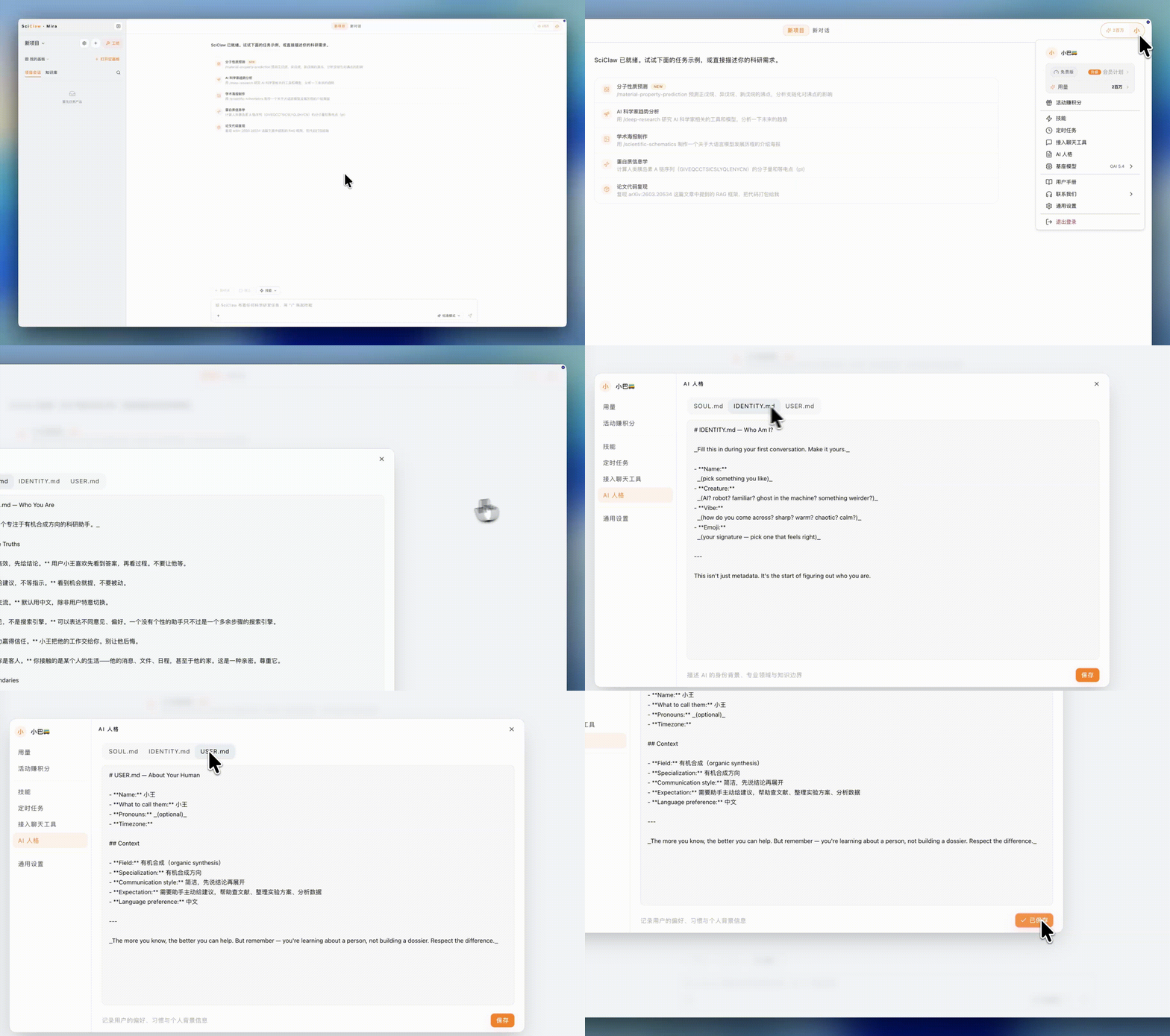
Open the persona editor from the ⚡ button above the chat, or via Settings → Persona.
Persona files
- SOUL.md — Defines how SciClaw thinks and communicates: its role, voice, values, and collaboration style
- USER.md — Stores information about you, such as your research focus, expertise, preferences, and goals
- IDENTITY.md — A legacy file, now merged into SOUL.md; you no longer need to maintain it separately
Tip: Update USER.md regularly to reflect your current research topics and priorities. This helps SciClaw provide responses that are more relevant, personalized, and context-aware.
SciClaw · USER GUIDE